 by
by IT Service Levels for UK SMEs: Defining SLAs and Measuring Performance
30 Sep, 2026You sign a contract with an IT provider. They promise "24/7 support" and "99% uptime." Sounds great, right? But what happens when your server crashes at 3 AM on a Sunday? Does "24/7" mean someone picks up the phone, or does it mean they actually fix the problem by morning? This is where most small businesses in the UK get burned. The gap between marketing promises and actual delivery is defined by one document: the Service Level Agreement, or SLA. For a UK Small and Medium-sized Enterprise (SME), this isn't just paperwork; it's your safety net.
If you're running a business with fewer than 250 employees, you likely don't have a dedicated IT department monitoring every packet of data. You rely on external partners. If their performance drops, your revenue stops. So, how do you define success? How do you measure if you're getting what you paid for? Let's break down exactly how to write an SLA that protects your business and how to track performance without needing a degree in computer science.
Why Generic Contracts Fail UK SMEs
Most off-the-shelf contracts are written for large corporations with legal teams. They use vague terms like "reasonable efforts" or "best endeavours." In the real world, "reasonable" is subjective. If your e-commerce site goes down during Black Friday sales, "reasonable effort" from your IT provider might mean they restart the server in two hours. That’s two hours of lost sales. A proper SLA removes subjectivity. It replaces feelings with facts.
Consider a typical scenario for a London-based accounting firm using cloud-based software. Their critical need isn't just internet connectivity; it's access to specific applications during working hours (9 AM to 6 PM GMT). If their IT provider has a global SLA based on US Pacific Time, the support window might be misaligned. By defining specific service windows, you ensure help arrives when you actually need it. This alignment is crucial because UK business hours differ significantly from those in the US or Asia, yet many managed service providers (MSPs) operate on follow-the-sun models that can leave gaps during local peak times.
The Core Components of a Solid SLA
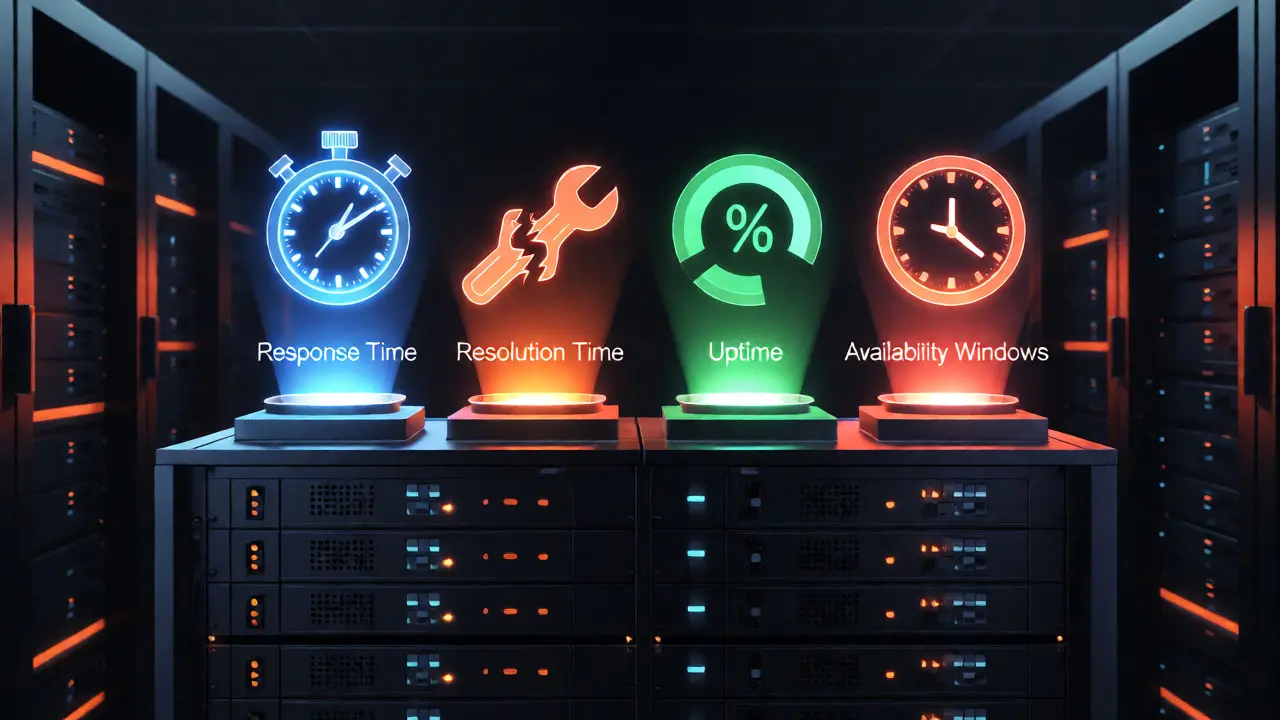
An effective SLA isn't a single number. It's a matrix of commitments. When reviewing or drafting your agreement, focus on these four pillars:
- Response Time: How quickly does the provider acknowledge your ticket? This is different from resolution time. Acknowledgement means a human has seen it and started working. Resolution means the issue is fixed.
- Resolution Time: The maximum time allowed to fully restore service. This should vary by severity. A total outage requires faster action than a printer jam.
- Uptime Guarantee: The percentage of time systems are operational. Note that 99.9% uptime sounds high, but it allows for nearly 9 hours of downtime per year. Is that acceptable for your operations?
- Availability Windows: Specific hours when support is guaranteed. Outside these hours, what is the protocol? Is there an emergency contact? What is the cost for out-of-hours work?
For UK SMEs, it is vital to align these components with your actual risk profile. A retail shop needs high availability during opening hours but can tolerate lower levels overnight. A financial services firm needs near-zero downtime during market hours. Don't pay for 24/7 uptime if your business closes at 5 PM.
Defining Severity Levels Clearly
Vague definitions cause disputes. You must categorize incidents into clear severity levels. Here is a standard framework adapted for SMEs:
| Severity Level | Description | Example Scenario | Target Response | Target Resolution |
|---|---|---|---|---|
| P1 - Critical | Total system failure affecting all users. Business halted. | Email server down; website inaccessible. | 15 minutes | 4 hours |
| P2 - High | Major function impaired. Workarounds difficult or non-existent. | CRM database slow; file share inaccessible for half the team. | 1 hour | 8 hours |
| P3 - Medium | Minor issue affecting some users. Workaround available. | One user cannot print; intermittent Wi-Fi dropouts. | 4 hours | 2 business days |
| P4 - Low | Cosmetic or informational. No impact on productivity. | Typo in internal wiki; request for new software license. | Next business day | 5 business days |
Notice the difference between P1 and P2. In a P1, everyone is stopped. In a P2, people are frustrated but can often continue working manually. Your SLA should reflect this reality. If you treat a P3 issue with the same urgency as a P1, you waste resources. If you treat a P1 like a P3, you lose money.
Measuring Performance: The Metrics That Matter
Once the SLA is signed, how do you know if it's being met? Many providers send monthly reports filled with technical jargon. Ignore the noise. Focus on three key performance indicators (KPIs).
First, look at Mean Time to Resolve (MTTR). This averages the time taken to fix incidents. If your MTTR for P1 issues is creeping up month over month, your infrastructure might be aging, or your provider is understaffed. Ask for the raw data behind the average. One massive outage can skew the average, hiding frequent small failures.
Second, track First Contact Resolution (FCR). Ideally, simple issues should be solved on the first call or email. If tickets bounce back and forth five times before resolution, your provider lacks knowledge transfer or documentation. High FCR saves your staff time chasing updates.
Third, monitor Proactive vs. Reactive Ratio. Are you calling them because things broke, or are they calling you because they spotted a problem? A good partner should prevent more issues than they fix. If you see a spike in reactive tickets after a patch update, investigate why the testing phase failed.
Financial Penalties and Credits
A promise without consequence is just a wish. Most SLAs include service credits-discounts on your monthly fee if targets aren't met. However, read the fine print carefully. Often, the credit is capped at 5% of the monthly fee. If a £2,000/month contract misses a target, you might get £100 back. Does that cover the £5,000 you lost in sales? Probably not.
For critical systems, consider negotiating higher penalty caps or even termination rights for repeated breaches. If your provider misses P1 resolution targets three months in a row, you should have the right to exit the contract without penalty. This leverage keeps providers honest. Also, clarify whether penalties apply to missed response times, resolution times, or both. Sometimes providers will hit the response time (acknowledge quickly) but fail the resolution time (take weeks to fix), avoiding penalties if the SLA is poorly drafted.

Common Pitfalls in UK IT Contracts
UK law offers some protections under the Consumer Rights Act 2015, but B2B contracts are largely governed by the terms agreed upon. Watch out for these traps:
- Exclusions for Maintenance: Providers often exclude planned maintenance from uptime calculations. Ensure you know when this maintenance occurs. If it happens during your peak trading hours, negotiate better windows.
- Force Majeure Loopholes: Check what constitutes a force majeure event. Does it include third-party cloud provider outages? If your provider relies on Microsoft Azure or AWS, and Azure goes down, is your provider liable? Usually, no. Understand who owns which part of the stack.
- Auto-Renewal Clauses: Many MSP contracts auto-renew annually unless cancelled 30-60 days in advance. Mark your calendar. Missing this window locks you in for another year, even if performance has dipped.
Another common issue is scope creep. If your business grows and you add new devices or locations, does the SLA automatically cover them? Or do you need a separate amendment? Define the asset list clearly. If you buy ten new laptops next quarter, ensure the SLA covers them immediately, or agree on a quick process to onboard them.
How to Review and Update Your SLA
Your business changes. Your IT needs change. An SLA written in 2024 might not fit your 2026 operations. Schedule quarterly reviews with your IT provider. Bring your own data. Show them your ticket logs. Highlight patterns. If you consistently have issues with backup verification, ask for a specific KPI on backup success rates.
Use these meetings to recalibrate expectations. Maybe you’ve moved to a hybrid work model, requiring support for home networks. Maybe you’ve adopted new compliance standards like ISO 27001, requiring stricter security reporting. The SLA should evolve alongside your strategy. Treat it as a living document, not a static archive.
Finally, remember that technology is only as good as the communication around it. Even the best SLA fails if your staff doesn't know how to report issues correctly. Train your team on severity classification. If they label a broken mouse as a P1 Critical Outage, you dilute the importance of true emergencies. Clear communication starts internally.
What is the difference between Uptime and Availability?
Uptime typically refers to the hardware or server being powered on and reachable. Availability includes the ability of users to actually perform their tasks. A server can be "up" (pingable) but unavailable if the application running on it is crashed or unresponsive. Always measure availability from the user's perspective.
Can I enforce SLA penalties in court?
Yes, but litigation is expensive and time-consuming for SMEs. Most SLAs specify that service credits are the sole remedy for breaches. This means you accept a discount on your bill rather than suing for consequential damages (like lost profits). Negotiate this clause carefully if your business relies heavily on continuous operation.
How does GDPR affect my IT SLA?
If your IT provider accesses personal data, they are a Data Processor. Your SLA should reference the Data Processing Agreement (DPA). Breaches involving data loss may have specific notification timelines (e.g., within 24 hours) distinct from general technical faults. Ensure these regulatory requirements are integrated into the incident response procedures.
Should I hire an MSP or a freelancer for SLA-backed support?
Freelancers rarely offer formal SLAs with financial penalties. They rely on reputation and relationship. MSPs provide structured SLAs, redundancy, and broader skill sets. For critical business functions, an MSP is usually safer. For occasional, low-risk tasks, a trusted freelancer may suffice, but understand you lack contractual recourse for delays.
What is a reasonable uptime target for a small business?
For most SMEs, 99.5% to 99.9% is realistic. 99.99% (four nines) costs significantly more and often requires redundant infrastructure that exceeds the budget of smaller firms. Calculate your tolerance: 99.5% allows about 44 hours of downtime per year. If you can survive that spread across minor outages, aim for that. If you cannot afford any downtime during trading hours, negotiate specific windows instead of overall percentages.